Guide
Assam Lottery Result PDF: Save Any Day’s Full Sheet
Updated · Assam Lottery Result
An Assam lottery result PDF lets you keep a full day of results on your phone, print it for your shop or send it to family. Every stored day has a ready-made PDF with the full sheet of all 12 series and a result image you can share — both made by us from the published numbers. You can also print any page yourself with the Save as PDF button.
The newest stored draw is Saturday, 7 November 2026. Open the newest day page, check your ticket, then save the sheet if you want a copy.
Download the latest Assam lottery result PDF
Here is the newest stored draw as a ready-made file. The PDF has a summary page with every 1st and 2nd prize, then the full sheet of each series, two series to a page. The image is a single card made for sharing on chat apps.
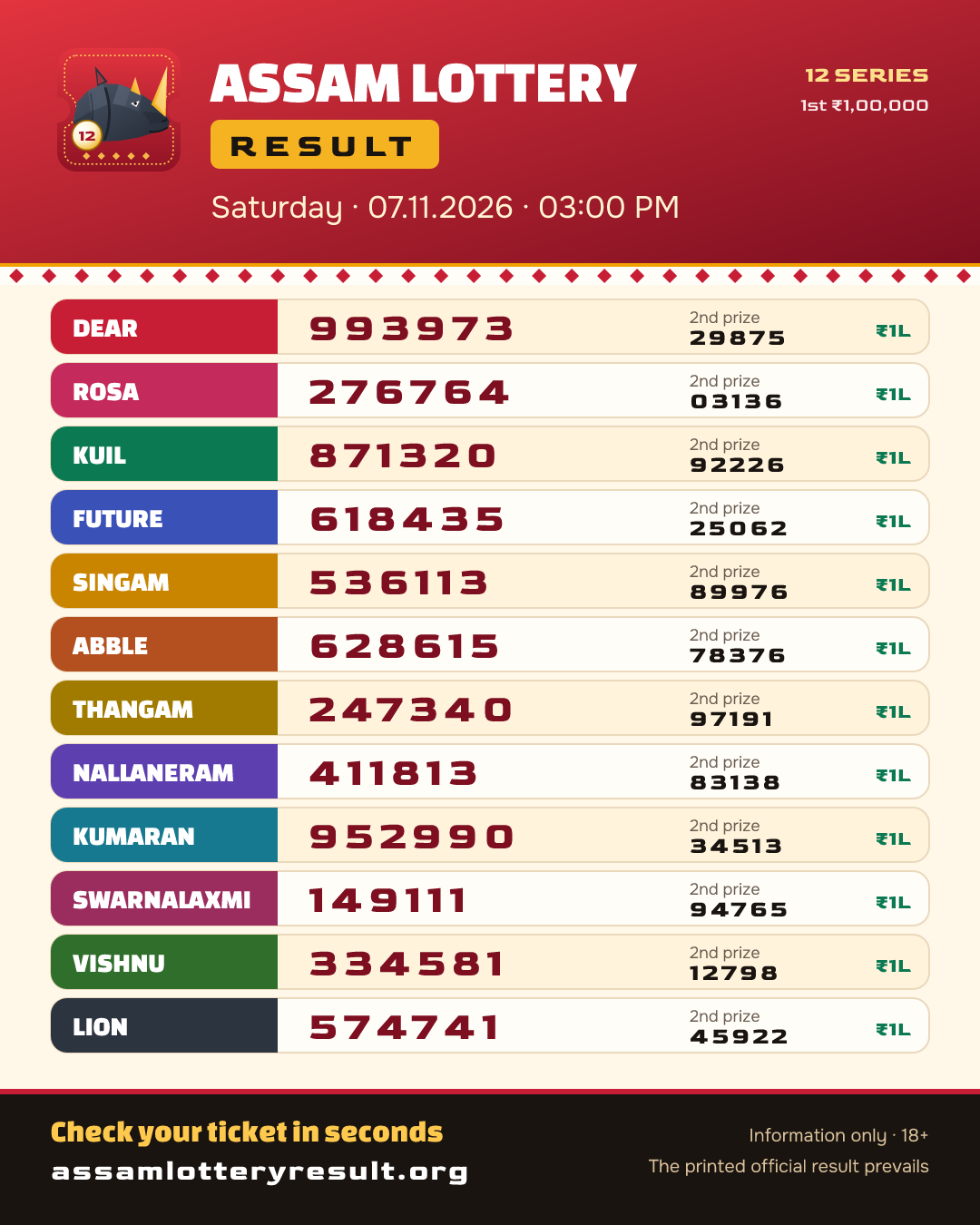
Assam lottery result PDF · 07.11.2026
7 November 2026, 03:00 PM. The PDF holds the full prize sheet of every series; the image shows the 1st and 2nd prizes — easy to share.
Made by Assam Lottery Result from the published numbers. Information only — the printed official result prevails.
Recent days
- 06.11.2026PDF ⬇
- 05.11.2026PDF ⬇
- 04.11.2026PDF ⬇
- 03.11.2026PDF ⬇
- 02.11.2026PDF ⬇
- 01.11.2026PDF ⬇
- 31.10.2026PDF ⬇
- 30.10.2026PDF ⬇
- 29.10.2026PDF ⬇
- 28.10.2026PDF ⬇
- 27.10.2026PDF ⬇
- 26.10.2026PDF ⬇
- 25.10.2026PDF ⬇
- 24.10.2026PDF ⬇
Older dates are on their own day pages: open the old results archive, pick the date and use the download buttons under the sheets.
What an Assam lottery result PDF contains
A day page holds all 12 series of the 03:00 PM draw. Each series has its own full sheet with 132 winning numbers, so one day comes to 1,584 numbers. That is a lot to copy by hand, which is why a saved sheet helps.
If you prefer to print a page yourself, tap Save as PDF: the page switches to a print layout, opens every sheet, and hides the menu, the footer and the buttons. What stays is the date, the first-prize cards and the full sheet of every series, plus a short line that says the site is for information only.
| Part of the page | In the PDF? |
|---|---|
| Date and heading of the draw | Yes |
| First-prize card of every series | Yes |
| Full sheet of a series you opened | Yes, all prize tiers |
| Full sheet of every series | Yes — the button opens them all first |
| Menu, footer and buttons | No, hidden when saving |
| Information-only notice | Yes, one short line |
The prize amounts on every sheet are the same six tiers: ₹1,00,000, ₹7,000, ₹3,500, ₹200, ₹100, ₹50. If a file shows other amounts, it did not come from a genuine sheet of this draw. More on that in the fake PDF section below.
Save the result as a PDF on Android (Chrome)
Most readers use Chrome on an Android phone. The steps take less than a minute. The Save as PDF button opens every sheet for you before printing.
- Open the day page and tap the series names to open their full sheets.
- Tap the Save as PDF button near the top of the page.
- The print screen opens. At the top, tap the printer name and choose “Save as PDF”.
- Tap the round PDF button on the right side of the screen.
- Pick a folder, such as Downloads, check the file name, then tap Save.
The Assam lottery result PDF is now on your phone. Open it from the Files app or from the downloads list in Chrome. It works without internet, so you can check it later on a slow connection.
On a computer the idea is the same. The button opens the print window; set the destination to “Save as PDF” and click Save.
Save the result as a PDF on iPhone (Safari)
iPhones do the same job with slightly different steps. The PDF is made by the phone itself, so nothing extra needs to be installed.
- Open the day page in Safari and open the series sheets you want.
- Tap Save as PDF. The print options screen opens.
- Tap the share icon at the top of that screen. On older iPhones, first spread two fingers on the page preview to open it full size, then tap share.
- Choose “Save to Files”, pick a place such as On My iPhone, and tap Save.
You can also send the PDF straight from the share menu to a chat app or email, without saving it first. Whichever you choose, the file keeps the date heading, so the person who gets it knows which draw it shows.
| Step | Android (Chrome) | iPhone (Safari) | Computer |
|---|---|---|---|
| 1 | Open the sheets you want | Open the sheets you want | Open the sheets you want |
| 2 | Tap Save as PDF | Tap Save as PDF | Click Save as PDF |
| 3 | Printer: choose “Save as PDF” | Tap the share icon | Destination: “Save as PDF” |
| 4 | Tap the round PDF button | Choose “Save to Files” | Click Save |
| 5 | Pick a folder and Save | Pick a place and Save | Pick a folder |
Print tips for a clean sheet
Shops and ticket holders often want paper. The same button prints straight to a printer if your phone or computer is connected to one. A few small choices keep the print neat.
- Use A4 paper in portrait. The sheets are laid out for a narrow page.
- Open only the series you need. Twelve full sheets can run to several pages.
- Look at the page count in the preview before you print, so you do not waste paper.
- Turn off background graphics if your printer offers it. It saves ink and keeps the digits sharp.
- If the digits look small, raise the scale a little in the print settings.
Keep in mind that a printout is a copy of a web page. If the lottery department later corrects a number, your paper will not change. For anything that matters, such as a prize, look again at the current day page and at the officially printed result.
How to spot a fake result PDF or image
Fake result files and pictures spread on social media and chat apps every day. Some are made to sell “tips”, some to steal money, some just for clicks. A fake Assam lottery result PDF can look very real at first glance.
The good news is that most fakes fail a simple check. Look for these signs.
| What you see | Why it is a warning |
|---|---|
| A date or weekday that does not match | Fakes are often old sheets with the date edited, or a date that falls on the wrong weekday. |
| Series names that are not among the 12 | Every sheet of this draw belongs to one of 12 named series. A new or misspelt name is a red flag. |
| Odd fonts, blurred digits, uneven lines | Edited numbers rarely line up with the rest of the sheet. |
| Prize amounts that differ from the six tiers | Every series pays the same six amounts: ₹1,00,000, ₹7,000, ₹3,500, ₹200, ₹100, ₹50. |
| Numbers that do not match a trusted list | Compare a few numbers with the day page here. One mismatch is enough to stop trusting the file. |
| An offer to sell the result or an “early” copy | Nobody has the numbers before 03:00 PM. A seller is always a scammer. |
The quickest test is to compare. Open the day page for the date in the file and read two or three numbers from different series. If they match, the file is likely a copy of a real sheet; if they do not, delete it and warn whoever sent it.
If a fake file uses our name, please tell us where you saw it. And if someone asked you for money for a result or a prize, our guide to lottery scams and fake images lists the steps to report it.
PDFs of older results
The Save as PDF button is on every stored day, not only the newest. Our archive holds 568 draw days from January 2025 onwards, each on its own page.
To find a past date, open the old results by date and pick the day. For the day before the latest draw, yesterday’s sheets are one tap away. The steps to save are the same as above.
Want to see what is new right now? All 12 series today are on the front board, which fills itself just after 03:00 PM.
Play safe
A real result is never sold. Do not pay anyone for a result PDF, an early result or a “confirmed” number. Buy tickets only where your state allows lotteries, and only spend what you can afford to lose.
18+ only. Scam call or message? Cyber-fraud helpline 1930 or cybercrime.gov.in. Free, private mental-health help: Tele-MANAS 14416.
Questions about saving and sharing results
Is there a download link for the Assam lottery result PDF?
There is no file to download. Instead, every day page has a Save as PDF button. It opens your phone’s print screen, where you pick “Save as PDF”, and the phone makes the file for you.
Is there a ready-made PDF, or do I have to print the page?
Both work. Every stored day has a ready-made PDF with all 12 full sheets: tap Download PDF on the day page. The Save as PDF button prints the page itself and opens every sheet first.
Does saving a PDF cost anything or need an app?
No. It uses the print feature already built into Chrome on Android and Safari on iPhone. You need no app, no account and no payment.
Can I trust a result PDF someone sent me?
Only after you compare it. Open the day page for that date here and check the series and numbers one by one. If anything differs, trust the officially printed result and not the file.
Can I get a PDF of an old result?
Yes. Open the old results page, pick the date, and use the same Save as PDF button. It works the same way on every stored day.
Where does the PDF go on my phone?
On Android it usually goes to the Downloads folder unless you choose another. On iPhone it goes to the place you pick in Save to Files, often “On My iPhone” or iCloud Drive.
Someone is selling the result PDF before 3 PM. Is it real?
No. Nobody has the numbers before the draw. Anyone who sells an “early” result is running a scam. Do not pay and do not share your details.
Your Assam lottery result PDF in a few taps
An Assam lottery result PDF is one tap away: download the ready-made file from any day page, or tap Save as PDF to print the page yourself. It costs nothing and needs no app.
Treat any file you receive with care. Check the date, the series and a few numbers against the day page, and remember that the officially printed result is the one that counts.

Need the newest sheet?
Open the result of 7 November 2026 with all 12 series and save it as a PDF.